1) Overview
Squarespace’s built-in search only finds content created inside Squarespace (pages, blog posts, products). It does not search embedded content such as ITI Digital Events & Business Listings.
This integration adds ITI Digital Events & Business Listing results to the existing Squarespace search page by:
Reading the search keyword from the URL (example:
/search?q=music)Fetching matching Event and Business Listing data from ITI Digital’s JSON data feed
Displaying those results on the same search page
Keeping Squarespace’s default search results intact
✅ No change to Squarespace templates needed
✅ Works only on the search page (does not affect other pages)
2) What you need before starting
Please have the following information ready:
A) Your site’s Squarespace Search page URL
Pls add Search link in navigation:
Go to Pages
Add a Link
Set the URL to:
/search?q=
Name it: Search
Save
Most sites use:
https://yourdomain.com/search?q=
B) ITI Digital JSON feed URL and key
Example:
https://api.imgoingcalendar.com/api/v2.0/SavannahGA/events?limit=20&key=
C) Your Account Events & Places Routes
Your account Route can be found in the JSON feed URL. The route is highlighted in bold in the example URL below:
https://api.imgoingcalendar.com/api/v2.0/SavannahGA/events?limit=20&key=
These are always:
<CLIENT_ROUTE>/events<CLIENT_ROUTE>/places
Example:
SavannahGA/eventsSavannahGA/places
Please contact the ITI Digital Support Team to confirm your JSON feed URL and Routes!
3) Installation steps in Squarespace
Step 1 — Log into Squarespace
Open Squarespace admin
Select your website
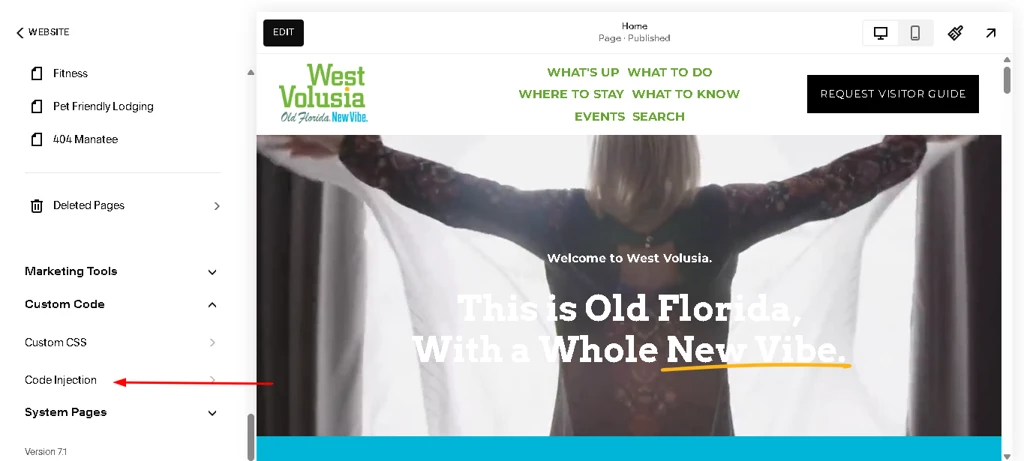
Step 2 — Open Code Injection
Go to Pages
Go to Custom Code
Click Code Injection
Step 3 — Paste the integration code
Scroll to the Footer section (important)
Paste the below full script provided for ITI search integration
<script> (() => { const CONFIG = { apiBase: "https://stagingapi.imgoingcalendar.com/api/v2.0/", eventsRoute: "SavannahGA/events", placesRoute: "SavannahGA/places", openInNewTab: true, minTokenLength: 3, minScoreToShow: 240, requireAllTokens: true, maxWaitMs: 12000, pollEveryMs: 200 }; // ---------------- Helpers ---------------- const stripHtml = (html="") => { const tmp = document.createElement("div"); tmp.innerHTML = String(html); return (tmp.textContent || tmp.innerText || "").trim(); }; const esc = (s="") => String(s) .replaceAll("&","&").replaceAll("<","<").replaceAll(">",">") .replaceAll('"',""").replaceAll("'","'"); const normalizeText = (s="") => stripHtml(s) .toLowerCase() .replace(/[^\p{L}\p{N}\s]/gu, " ") .replace(/\s+/g, " ") .trim(); const trimWords = (text="", maxWords=28) => { const clean = String(text).replace(/\s+/g, " ").trim(); if (!clean) return ""; const words = clean.split(" "); return words.length > maxWords ? words.slice(0, maxWords).join(" ") + "…" : clean; }; const buildUrl = (route, q) => { const base = CONFIG.apiBase.replace(/\/+$/, "") + "/"; const r = route.replace(/^\/+/, ""); const url = new URL(base + r); url.searchParams.set("search", q); return url.toString(); }; function extractList(data, fallbackKey) { if (!data) return []; if (Array.isArray(data)) return data; if (Array.isArray(data[fallbackKey])) return data[fallbackKey]; if (Array.isArray(data.events)) return data.events; if (Array.isArray(data.places)) return data.places; if (Array.isArray(data.items)) return data.items; if (Array.isArray(data.data)) return data.data; return []; } function normalizeItem(item, type) { const titleRaw = item.title || item.name || ""; const descRaw = item.descriptionText || item.description || item.about || ""; const img = item.cover?.source || item.cover || item.image || ""; const link = item.ImGoingLink || item.imGoingLink || item.url || item.link || item.eventLink || ""; return { type, title: titleRaw, desc: stripHtml(descRaw), img, link, _titleN: normalizeText(titleRaw), _descN: normalizeText(descRaw) }; } function getTokens(query) { const qNorm = normalizeText(query); const tokens = qNorm.split(" ").filter(t => t.length >= CONFIG.minTokenLength); return { qNorm, tokens }; } function scoreItem(item, qNorm, tokens) { const t = item._titleN, d = item._descN; if (!t) return 0; if (t === qNorm) return 1000; if (CONFIG.requireAllTokens && tokens.length) { const allFound = tokens.every(w => t.includes(w) || d.includes(w)); if (!allFound) return 0; } let score = 0; if (t.startsWith(qNorm)) score += 600; if (t.includes(qNorm)) score += 350; const titleHits = tokens.filter(w => t.includes(w)).length; const descHits = tokens.filter(w => d.includes(w)).length; score += titleHits * 140 + descHits * 50; return score; } function rankAndFilter(items, query) { const { qNorm, tokens } = getTokens(query); if (!qNorm || tokens.length === 0) return []; return items .map(it => ({ ...it, _score: scoreItem(it, qNorm, tokens) })) .filter(it => it._score >= CONFIG.minScoreToShow) .sort((a,b) => b._score - a._score); } async function fetchJson(url, signal) { const res = await fetch(url, { method: "GET", signal }); if (!res.ok) throw new Error("HTTP " + res.status); return res.json(); } // ---------------- Inject UI ---------------- function injectCss() { if (document.getElementById("iti-ss-style")) return; const css = document.createElement("style"); css.id = "iti-ss-style"; /* ✅ This CSS mimics Squarespace default search list (image left, text right, divider) */ css.textContent = ` /* ====== Squarespace-like list styling for Events & Places ====== */ .iti-ss-wrap{ max-width: 1100px; margin: 28px auto 50px; padding: 0 20px; } /* header */ .iti-ss-head{ margin: 0 0 10px; } .iti-ss-title{ margin: 0; font-size: 20px; font-weight: 700; color: #000; } .iti-ss-sub{ margin-top: 6px; font-size: 14px; color: rgba(0,0,0,.75); } .iti-ss-status{ margin-top: 10px; font-size: 14px; color: rgba(0,0,0,.75); } /* results list = same as default search (simple divider list) */ .iti-ss-results{ margin-top: 12px; display: block; border-top: 1px solid rgba(255,255,255,.25); } /* each row */ .iti-ss-row{ display: flex; align-items: flex-start; /* ✅ matches default list */ gap: 22px; padding: 18px 0; border-bottom: 1px solid rgba(255,255,255,.25); } /* thumbnail fixed size like native list */ .iti-ss-thumb{ flex: 0 0 140px; width: 140px; height: 105px; overflow: hidden; background: rgba(255,255,255,.10); } /* ✅ Force full cover crop (fixes “not looking as it is”) */ .iti-ss-thumb img{ width: 100%; height: 100%; object-fit: cover; object-position: center center; display: block; } /* right side */ .iti-ss-meta{ flex: 1 1 auto; min-width: 0; /* ✅ prevents overflow + alignment issues */ padding-top: 2px; /* small nudge like SS */ } /* small label */ .iti-ss-type{ margin: 0 0 6px; font-size: 11px; letter-spacing: 1px; text-transform: uppercase; color: rgba(255,255,255,.70); } /* title matches native list */ .iti-ss-name{ margin: 0 0 6px; font-size: 22px; font-weight: 700; line-height: 1.15; color: #fff; word-break: break-word; } /* excerpt */ .iti-ss-desc{ margin: 0; font-size: 13px; line-height: 1.45; color: rgba(255,255,255,.75); max-width: 70ch; } /* link behavior */ .iti-ss-link{ display: block; text-decoration: none !important; } .iti-ss-link:hover .iti-ss-name{ text-decoration: underline; } /* responsive */ @media (max-width: 680px){ .iti-ss-row{ gap: 14px; } .iti-ss-thumb{ flex-basis: 110px; width: 110px; height: 85px; } .iti-ss-name{ font-size: 18px; } } `; document.head.appendChild(css); } function removeOld() { const old = document.getElementById("itiSsWrap"); if (old) old.remove(); } // Hide/show Squarespace no results message function toggleNoResultsMessage(shouldHide) { const needles = [ "Your search did not match any results", "Try a different search" ]; const candidates = Array.from(document.querySelectorAll("main, #page, body *")) .filter(el => el && el.textContent && needles.some(n => el.textContent.includes(n))); candidates.sort((a,b) => (a.textContent.length || 0) - (b.textContent.length || 0)); const msgEl = candidates[0]; if (!msgEl) return; if (shouldHide) { if (!msgEl.dataset.itiOrigDisplay) msgEl.dataset.itiOrigDisplay = msgEl.style.display || ""; msgEl.style.display = "none"; } else { msgEl.style.display = msgEl.dataset.itiOrigDisplay || ""; } } // Insert AFTER Squarespace default results when possible function findInsertPoint() { const resultsContainer = document.querySelector(".search-results") || document.querySelector(".SearchResults") || document.querySelector("[data-search-results]") || document.querySelector("[class*='search-results']") || document.querySelector("[class*='SearchResults']"); if (resultsContainer) return { mode: "after-results", el: resultsContainer }; const input = document.querySelector('input[name="q"], input[type="search"]'); if (input) { const anchor = input.closest("form") || input.closest("section") || input.parentElement; return { mode: "after-input", el: anchor }; } return { mode: "prepend-main", el: document.querySelector("main") || document.body }; } function injectContainer(q) { removeOld(); const target = findInsertPoint(); if (!target || !target.el) return false; const wrap = document.createElement("section"); wrap.className = "iti-ss-wrap"; wrap.id = "itiSsWrap"; wrap.innerHTML = ` <div class="iti-ss-head"> <h2 class="iti-ss-title">Events & Places</h2> <div class="iti-ss-sub">Results for “${esc(q)}”</div> </div> <div class="iti-ss-status" id="itiSsStatus">Searching Events & Places…</div> <div class="iti-ss-results" id="itiSsResults"></div> `; if (target.mode === "after-results") { target.el.insertAdjacentElement("afterend", wrap); return true; } if (target.mode === "after-input") { target.el.insertAdjacentElement("afterend", wrap); return true; } target.el.prepend(wrap); return true; } // ---------------- Main ---------------- let aborter = null; function getQuery() { if (location.pathname !== "/search") return ""; const params = new URLSearchParams(location.search); return (params.get("q") || "").trim(); } async function runOnceReady() { const q = getQuery(); if (!q) { removeOld(); toggleNoResultsMessage(false); return; } injectCss(); // wait to mount container at correct place const start = Date.now(); while (Date.now() - start < CONFIG.maxWaitMs) { if (injectContainer(q)) break; await new Promise(r => setTimeout(r, CONFIG.pollEveryMs)); } const statusEl = document.getElementById("itiSsStatus"); const resultsEl = document.getElementById("itiSsResults"); if (!statusEl || !resultsEl) return; statusEl.textContent = "Searching Events & Places…"; resultsEl.innerHTML = ""; try { if (aborter) aborter.abort(); aborter = new AbortController(); const [eventsData, placesData] = await Promise.all([ fetchJson(buildUrl(CONFIG.eventsRoute, q), aborter.signal), fetchJson(buildUrl(CONFIG.placesRoute, q), aborter.signal) ]); const eventsRaw = extractList(eventsData, "events").map(x => normalizeItem(x, "Event")); const placesRaw = extractList(placesData, "places").map(x => normalizeItem(x, "Place")); const all = [...eventsRaw, ...placesRaw].filter(x => x.title && x.link); const ranked = rankAndFilter(all, q); if (!ranked.length) { // if API has no results, remove our section and allow Squarespace message const wrap = document.getElementById("itiSsWrap"); if (wrap) wrap.remove(); toggleNoResultsMessage(false); return; } // API results exist -> hide Squarespace "no results" toggleNoResultsMessage(true); statusEl.textContent = `Showing ${ranked.length} result(s).`; const targetAttrs = CONFIG.openInNewTab ? ' target="_blank" rel="noopener noreferrer"' : ""; /* ✅ HTML structure updated to match default list style */ resultsEl.innerHTML = ranked.map(item => { const title = esc(item.title); const link = esc(item.link); const type = esc(item.type); const desc = esc(trimWords(item.desc, 26)); const imgHtml = item.img ? `<img src="${esc(item.img)}" alt="${title}">` : ""; return ` <a class="iti-ss-link" href="${link}"${targetAttrs}> <div class="iti-ss-row"> <div class="iti-ss-thumb">${imgHtml}</div> <div class="iti-ss-meta"> <div class="iti-ss-type">${type}</div> <div class="iti-ss-name">${title}</div> ${desc ? `<div class="iti-ss-desc">${desc}</div>` : ""} </div> </div> </a> `; }).join(""); } catch (e) { if (e?.name === "AbortError") return; console.error(e); const wrap = document.getElementById("itiSsWrap"); if (wrap) wrap.remove(); toggleNoResultsMessage(false); } } // initial load if (document.readyState === "loading") { document.addEventListener("DOMContentLoaded", runOnceReady); } else { runOnceReady(); } // SPA navigation support const _push = history.pushState; const _replace = history.replaceState; function onRouteChange() { setTimeout(runOnceReady, 250); } history.pushState = function() { _push.apply(this, arguments); onRouteChange(); }; history.replaceState = function() { _replace.apply(this, arguments); onRouteChange(); }; window.addEventListener("popstate", onRouteChange); })(); </script>Click Save
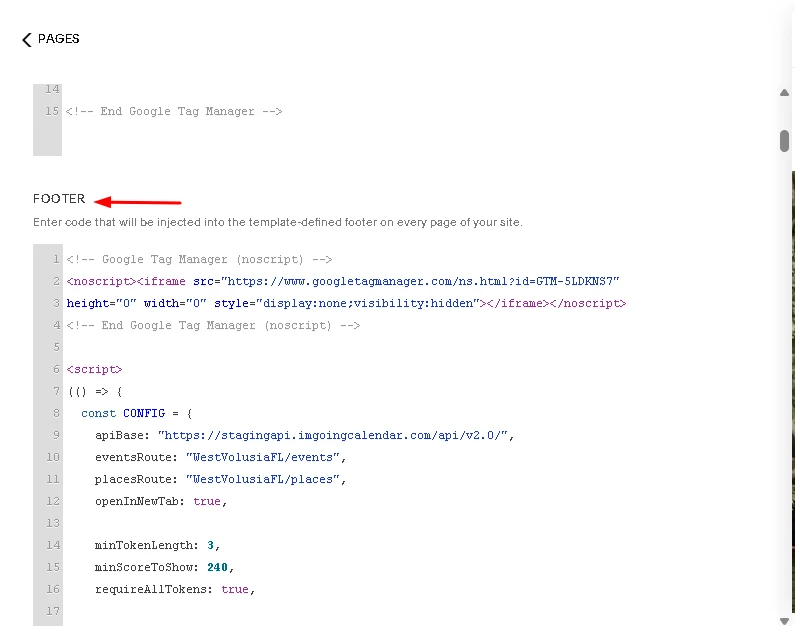
✅ We place it in Footer so it loads after the page content and does not interfere with Squarespace rendering.
5) Configuration (changing route for each client)
Inside the script, you will see a section similar to:
const CONFIG = { apiBase: "https://stagingapi.imgoingcalendar.com/api/v2.0/", eventsRoute: "SavannahGA/events", placesRoute: "SavannahGA/places", };What to change for a new client
Only replace the SavannahGA part with route.
Example for a client route AdventureCoast:
eventsRoute: "AdventureCoast/events", placesRoute: "AdventureCoast/places",✅ /events and /places must remain exactly the same.
6) How it works (simple explanation)
When someone searches on your Squarespace site:
They land on the standard Squarespace search page:
/search?q=keyword
Squarespace shows normal results (pages/blog)
This integration reads the
qkeyword from the URLThe script calls ITI APIs:
/events?search=keyword/places?search=keyword
It displays matching Events & Places results after the default Squarespace results
7) What users will see
Normal scenario
Squarespace results display first (pages/posts/products)
Then a section appears below:
“Events & Places” with matching results
If Squarespace finds no content but ITI finds results
The default “No results found” message is hidden
Events & Business Listings results will display normally
If nothing is found anywhere
Squarespace “No results found” message stays
Events & Business Listings section shows “No matching events or places found.”
9) Optional: Create a “Search” menu link
If you want a Search link in navigation:
Go to Pages
Add a Link
Set the URL to:
/search?q=
Name it: Search
Save
12) Summary
This method successfully adds ITI Events & Places into Squarespace search by:
✅ Using the existing search page (/search?q=)
✅ Fetching results from ITI’s public JSON endpoints
✅ Displaying them in a dedicated “Events & Business Listings” section
Was this article helpful?
That’s Great!
Thank you for your feedback
Sorry! We couldn't be helpful
Thank you for your feedback
Feedback sent
We appreciate your effort and will try to fix the article
