Overview
The AI Duplicate Event Detection feature uses AI to identify potential duplicates, helping keep your Events Calendar clean and organized, displaying only the best events for your approval.
When two events appear to represent the same real-world event, the AI compares both listings to determine whether they are duplicates. If the AI is not confident that the events are duplicates, both listings are kept to avoid removing legitimate events.
If the events are identified as duplicates, the AI recommends keeping the listing that provides the most complete and valuable information for visitors.
To make this decision, the AI evaluates factors including:
- Description quality and detail
- Venue information
- Ticket information
- Organizer details
- Categories and tags
- Contact information
- Overall completeness of the event listing
When two listings contain similar information, the AI generally prefers Facebook or Eventbrite listings over Google, unless the Google listing contains significantly more complete information.
Lastly, this new functionality completely eliminates the need for manual Similar Events review, and the Similar Events tab has been removed from the DXP Dashboard menu.
Reviewing Removed Events
Your team remains in control. You can review events that have been removed by AI by navigating to: Events Calendar → Content Parameters → Removed + Updated Events → AI Similar Removed Events
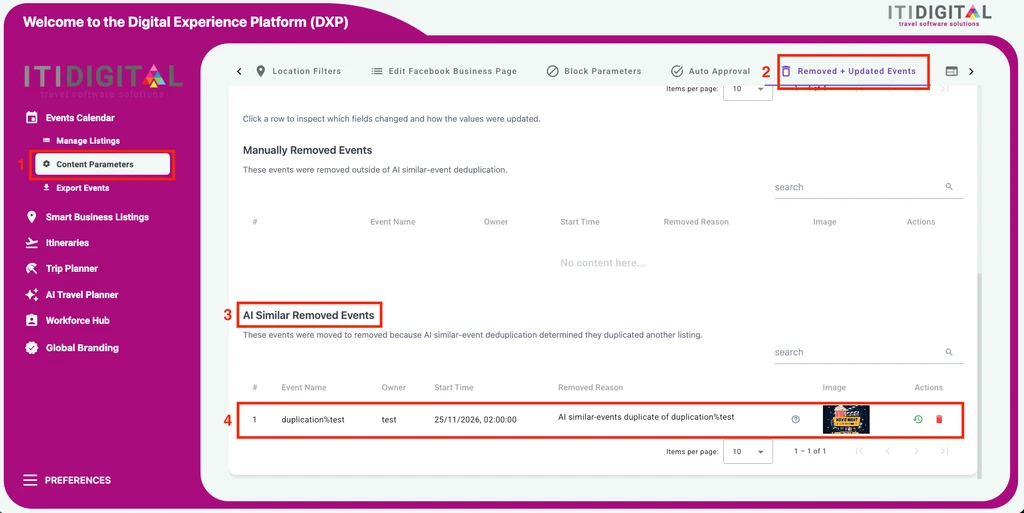
Click on the icon to compare the removed event with the event that was kept. The comparison displays both listings side by side, making it easy to review the AI's decision.
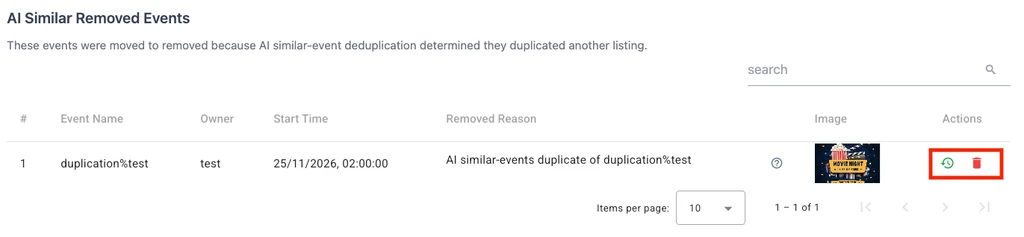
Use the Actions menu to:
- Restore the removed event, or
- Permanently remove it from your dashboard, if you wish. This is not a requirement, as our system will erase removed events every 90 days.
Event Protection Rules
To help protect important content, several safeguards are built into the duplicate detection process.
- Locked events are never removed.
- Events included in an Itinerary are always preserved.
- Events assigned to Custom Categories receive additional protection:
- If only one event belongs to a custom category, that category is automatically transferred to the retained event before the duplicate is removed.
- If both events are assigned to custom categories, the duplicate is flagged for manual review instead of being removed automatically.
These safeguards help preserve your manual edits and curated content while still allowing duplicate events to be cleaned up efficiently.
Was this article helpful?
That’s Great!
Thank you for your feedback
Sorry! We couldn't be helpful
Thank you for your feedback
Feedback sent
We appreciate your effort and will try to fix the article