The Auto-Approval feature allows you to automatically approve events from organizers or websites you trust, reducing manual review and speeding up event publishing.
How to Configure
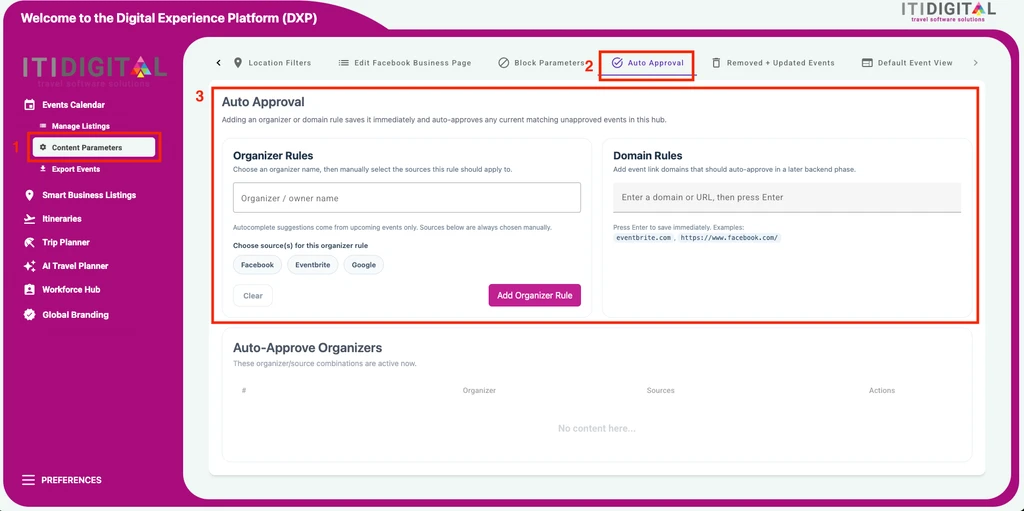
- Navigate to Events Calendar → Content Parameters → Auto Approval.
- Add one or more trusted sources:
Trusted Organizer
Enter:
Enter:
- Organizer name
- Source (Facebook, Eventbrite, or Google)
Then click Add Organizer Rule.
Trusted Domain
Enter the website domain and press Enter to save it.
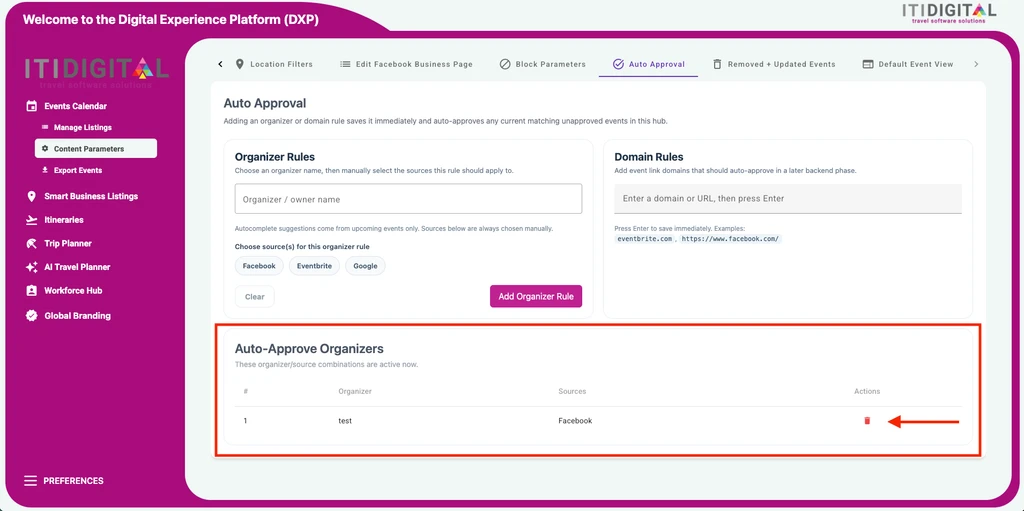
Trusted organizers and domains will appear in the table below and can be removed at any time using the trash icon.
How It Works
Once you've added a trusted organizer or domain:
- Existing matching events that are currently Unapproved are automatically approved.
- Newly imported events from trusted organizers or domains are also automatically approved, even if your Default Approval setting is Unapproved.
- Events that don't match a trusted organizer or domain continue to follow your normal approval workflow and require manual review.
Was this article helpful?
That’s Great!
Thank you for your feedback
Sorry! We couldn't be helpful
Thank you for your feedback
Feedback sent
We appreciate your effort and will try to fix the article