The newly available Updated Events dashboard historical report provides a history of changes made to your events, allowing you to review what was updated, when the changes occurred, and how individual fields were modified.
Please note that updates to this report are available from July 2026 forward.
Accessing the Report
To view the report, navigate to:
Events Calendar → Content Parameters → Removed + Updated Events → Updated Events
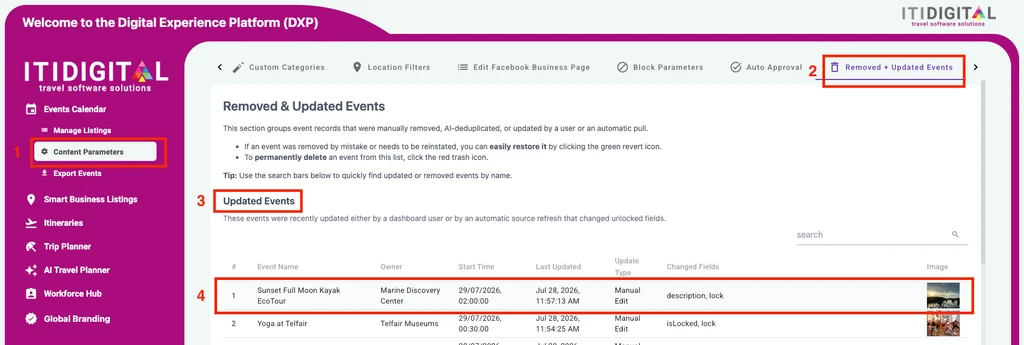
Viewing Event Changes
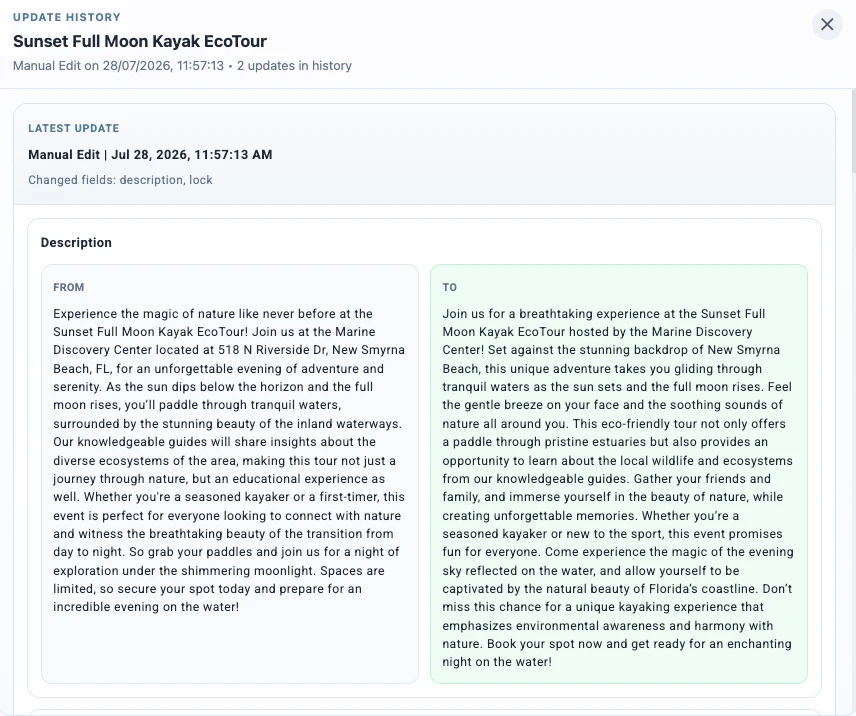
Click on any event in the report to view its update history.
The history includes:
- The date and time of each update
- The type of update (manual or automatic)
- The fields that were changed
- The previous and updated values for each field
Was this article helpful?
That’s Great!
Thank you for your feedback
Sorry! We couldn't be helpful
Thank you for your feedback
Feedback sent
We appreciate your effort and will try to fix the article